Kritika's Product Portfolio

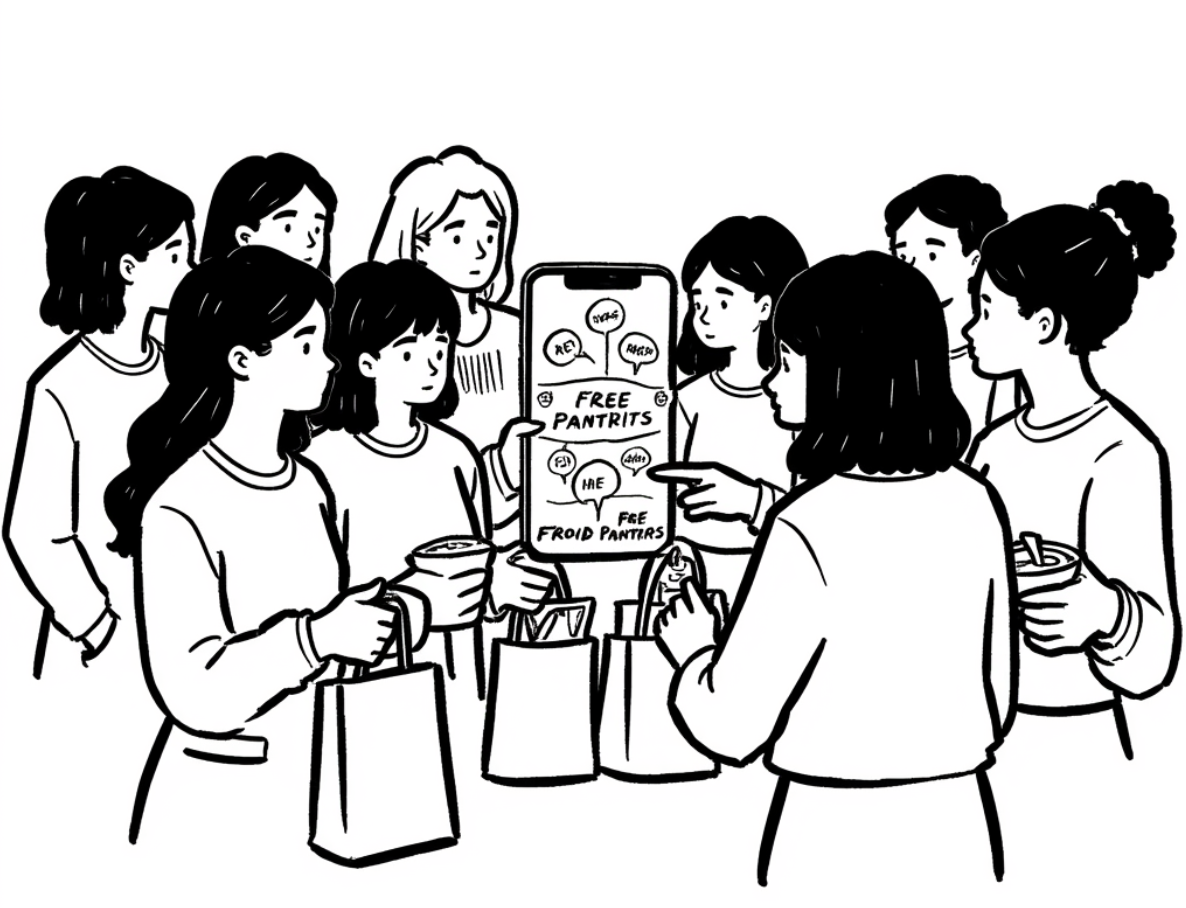
Illustration of Food Accessibility App

CampusConnect: Food Security App

Led UX redesign and data integration for an app connecting students to free meals, reducing food insecurity and improving campus resource access.

UX Design Data Integration Social Impact
Illustration for Carls Swap App

Carls Swap App

Designed an exchange platform to help Carleton students trade, donate, and reserve items more sustainably.

UX Research Figma Prototype Usability Testing
Illustration for the Carls Chat App platform

Real-Time Chat Platform for Campus

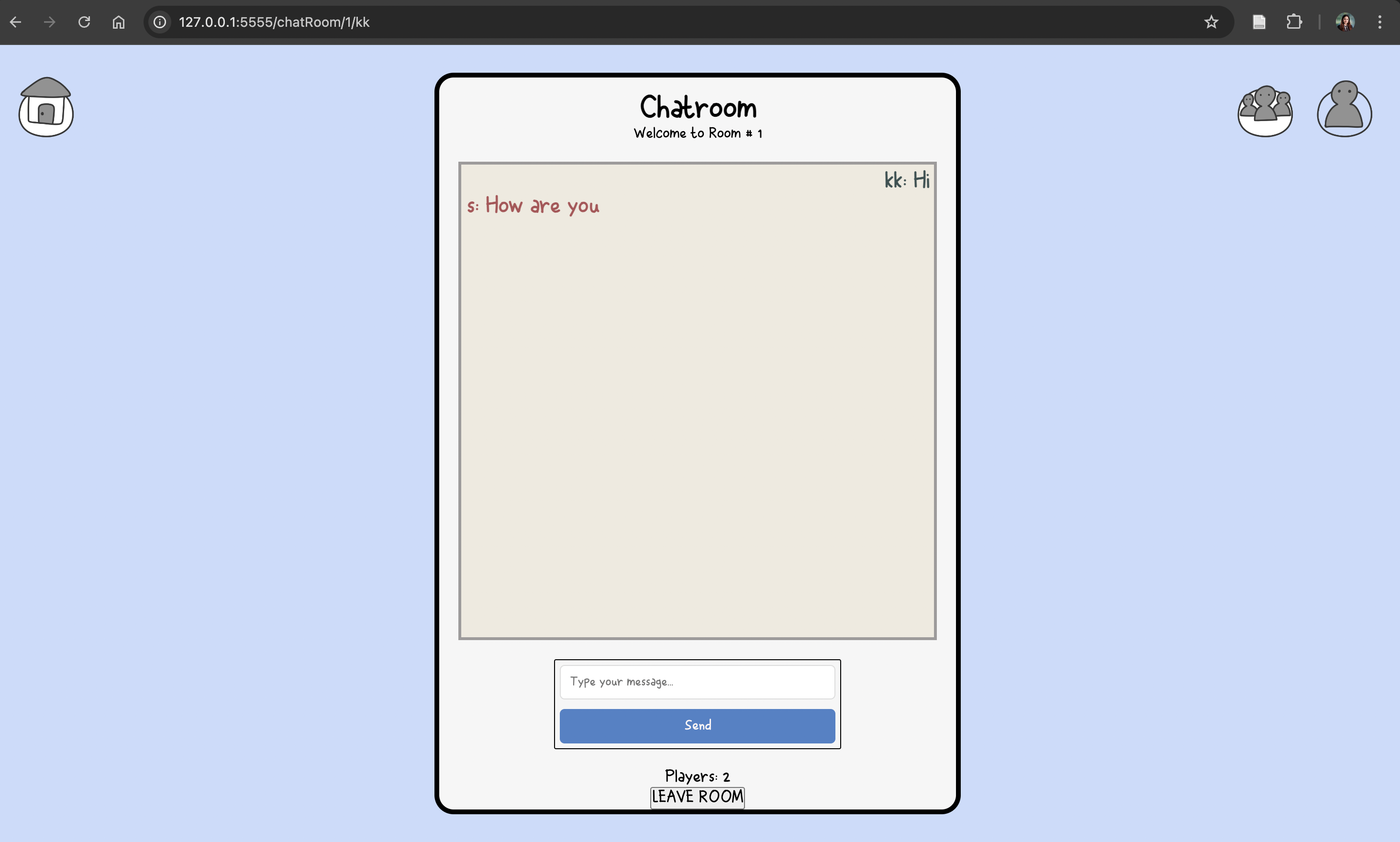
Developed a WebSocket-powered messaging app for Carleton students with private rooms, global chat, and live user updates.

Full-Stack Development WebSockets Student Community
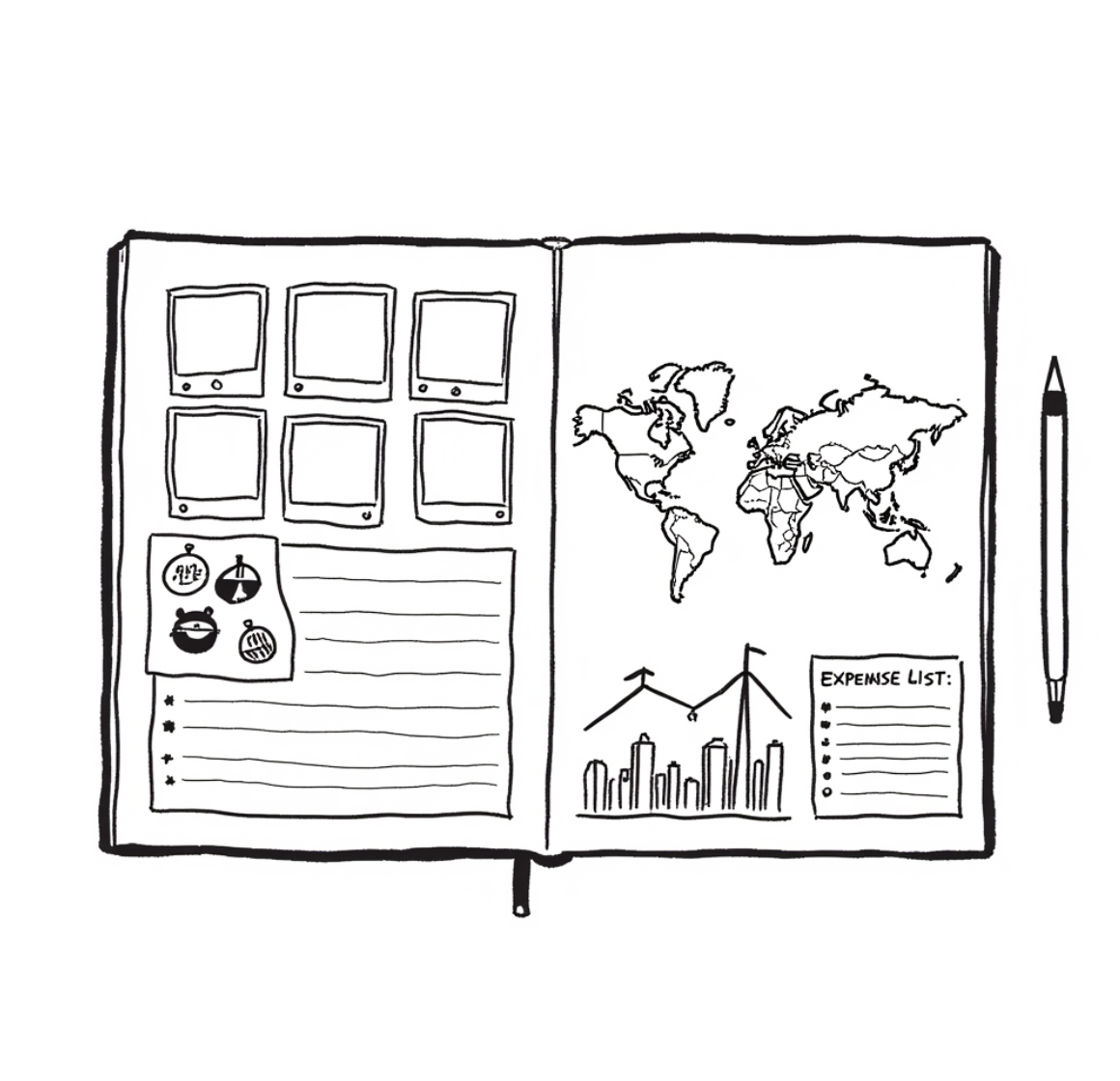
Illustration for the Travel Journal App

Travel Journal App

Designed and built a travel journaling app to manage itineraries, track expenses, and organize multimedia memories during trips.

Process Design Enterprise Analytics
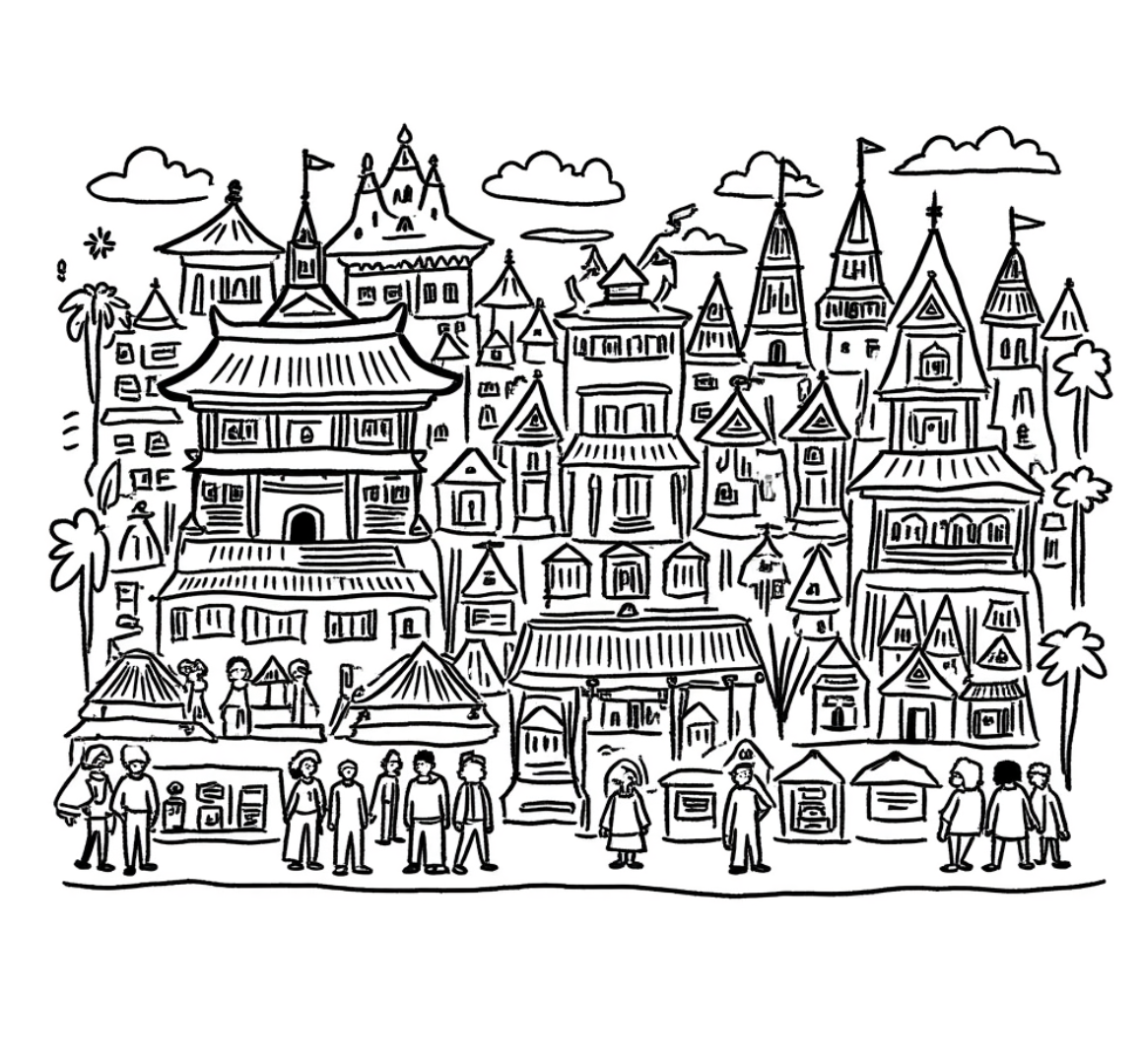
Illustration for the Singapore Project

Ethnicity, Nature, and Urban Life in Singapore

Exploring how Singapore weaves together culture, ecology, and community through inclusive urban planning, insights we aim to adapt in Nepal, Thailand, and Malaysia.

Urban Planning Cultural Heritage Sustainability
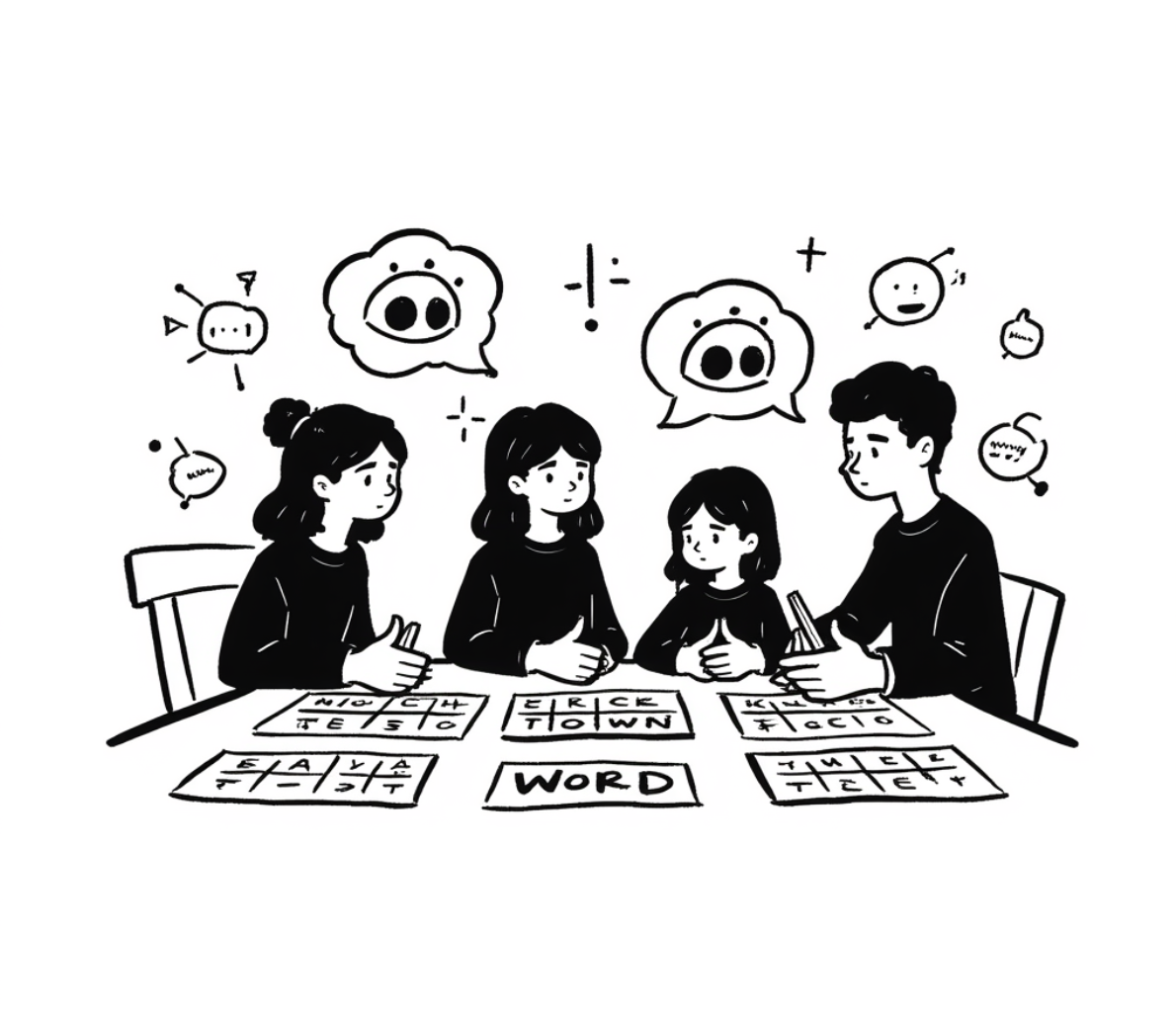
Illustration for the AI Puzzles Game

AI Puzzle Games at Carleton

Currently leading stakeholder interviews and participatory design workshops to build AI-powered puzzles that teach critical AI literacy through play.

UX Research Participatory Design Human-Centered AI

CampusConnect: Bridging Food Access Gaps for International Students

Introduction

Project Overview

CampusConnect is a mobile app prototype I helped build to address a challenge very close to my heart,food insecurity among international students. Many face not only financial hardships but also transportation and cultural barriers that make it hard to access nutritious food. Drawing from my own experiences as an international student, I worked with my team to design a system that connects students to surplus food, rideshares, and community resources, aiming to restore dignity and build supportive networks on campus.

Timeline

Ongoing(April – June 2025)

Team

Kritika, Cuong, Daniel

Problem Discovery & User Research

Research Methodology

  • Conducted interviews with 15 international students across 3 campuses
  • Distributed surveys to 120+ students dealing with food access challenges
  • Observed dining hall operations and spoke with campus staff
  • Engaged with stakeholders from dining, transportation, and international offices

Key Findings

  • Lack of transportation to grocery stores or pantries
  • Financial barriers due to currency gaps and work restrictions
  • Cultural disconnect when finding familiar, affordable food
  • Underused food resources and lack of awareness
  • Isolation and lack of peer support networks

What Users Said

“I skip meals sometimes because I don’t have money or a car, and I see so much food wasted in the dining hall. I wish there was a better way to access food that fits my culture and dietary needs.”
“I can’t work off-campus, so my budget is really tight. Some weeks, I survive on instant noodles just to make rent.”
“I didn’t even know the campus had a food pantry until my third year. These resources exist, but no one talks about them.”
“I often feel embarrassed asking for help. It would be nice to have something that doesn’t make me feel like a burden.”
“Sometimes I just want to cook something from home, but the ingredients are hard to find or super expensive.”

Problem Statement & Opportunity

International students face food insecurity driven by financial, logistical, and cultural barriers, despite campuses generating tons of edible food waste and offering underpublicized resources.

Opportunity Space

  • Make surplus food more accessible
  • Reduce food waste through redistribution
  • Enable shared transportation to grocery stores
  • Foster community through peer-based food sharing

Design Process

Approach

  • Design Thinking with student-centered empathy
  • Agile UX with weekly user testing and iteration
  • Accessibility-first for ESL and low-digital-literacy users

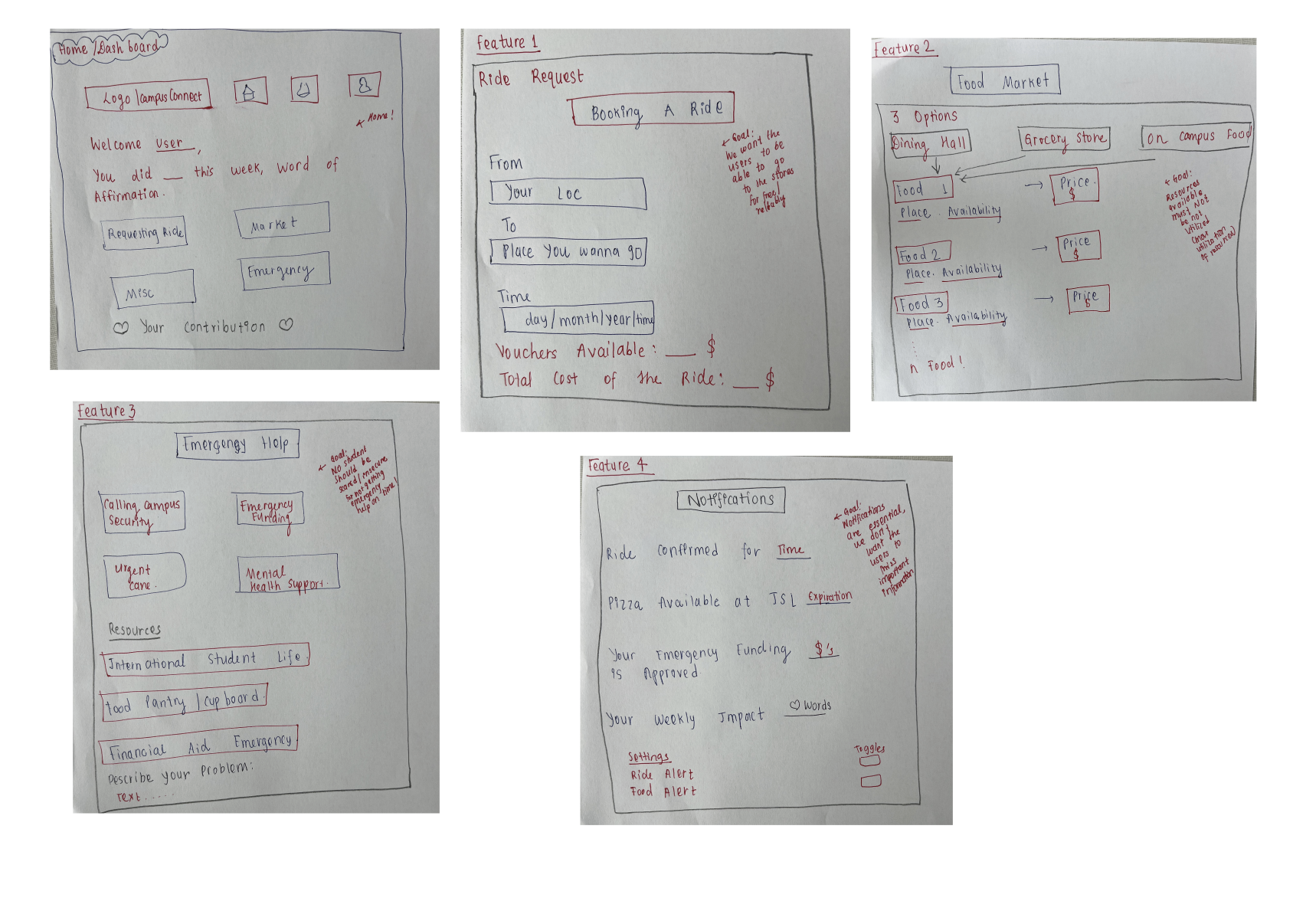
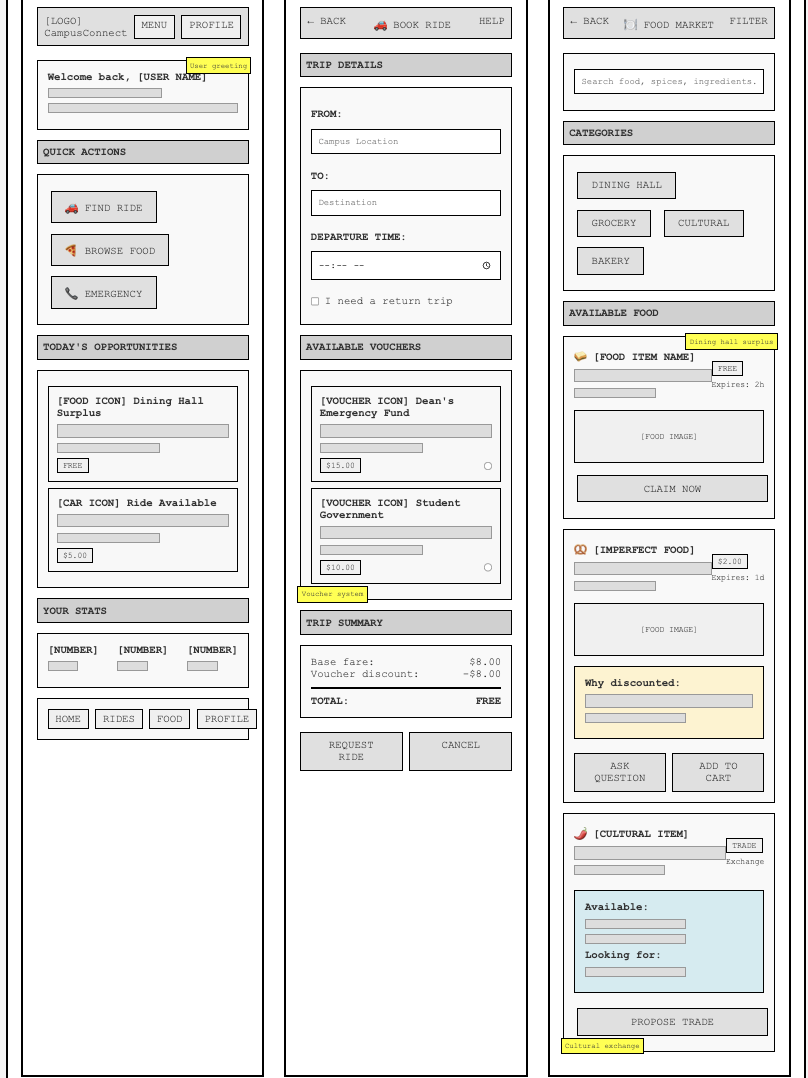
Paper Prototype

We started with a hand-drawn paper prototype to explore ideas quickly and validate basic layouts. Students provided feedback on navigation clarity and feature relevance before we moved to digital tools.

Paper Prototype

User Feedback Highlights (Paper)

  • “I like seeing everything on one dashboard, it makes things feel organized.”
  • “This feels like something I’d use when I’m stressed and need quick help.”
  • “Can this include food from my culture? That would be amazing.”
  • “Emergency food help should be easier to spot.”

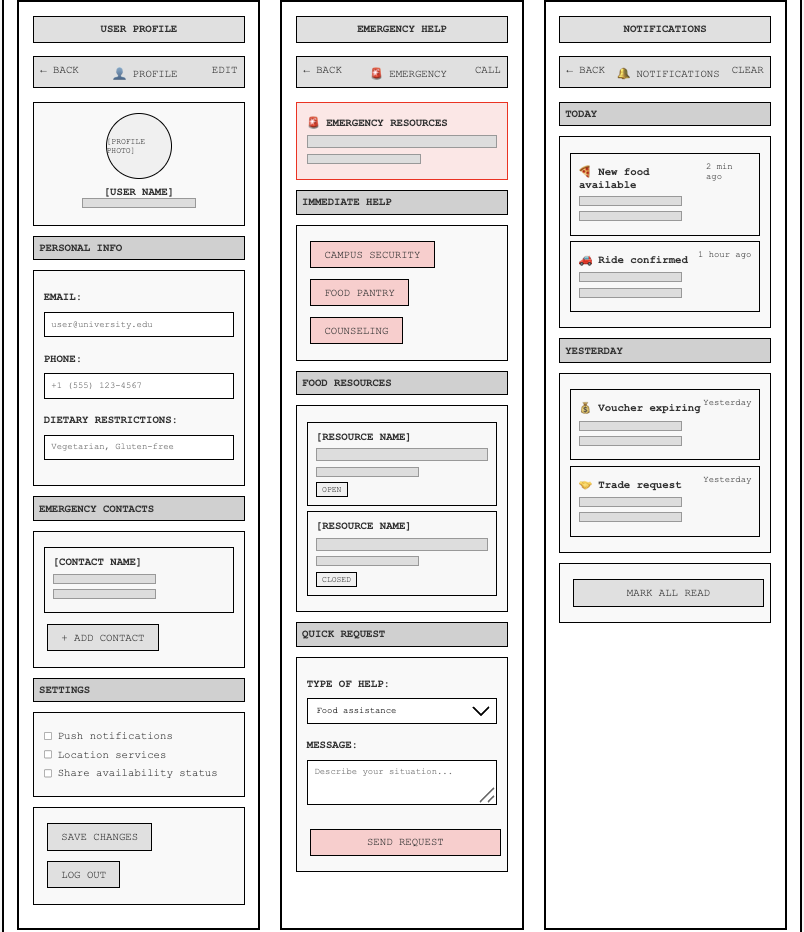
Low-Fidelity Prototype

We created black-and-white Figma wireframes focused on usability. These low-fidelity designs helped us test navigation flows and screen structure without visual distractions.

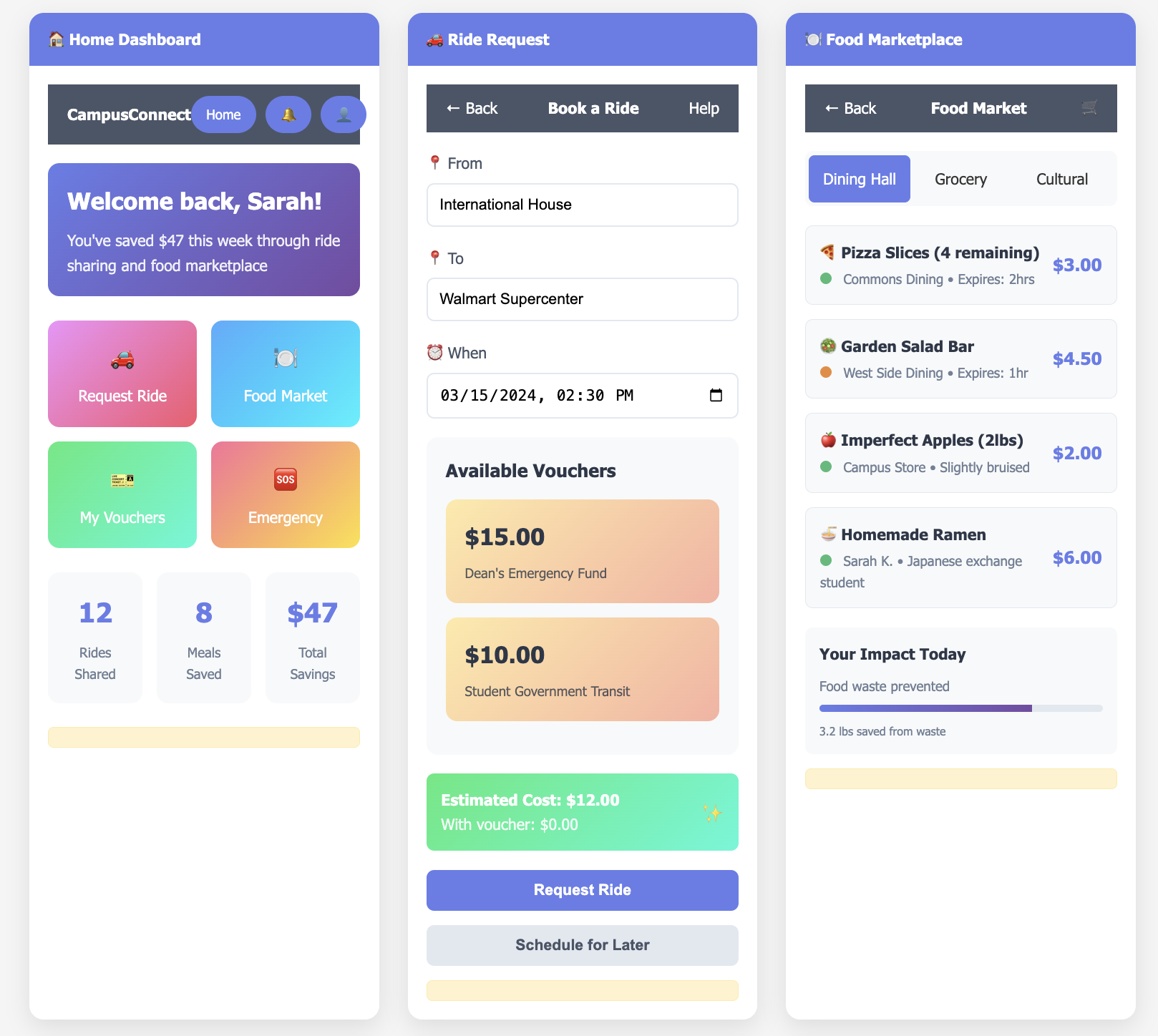
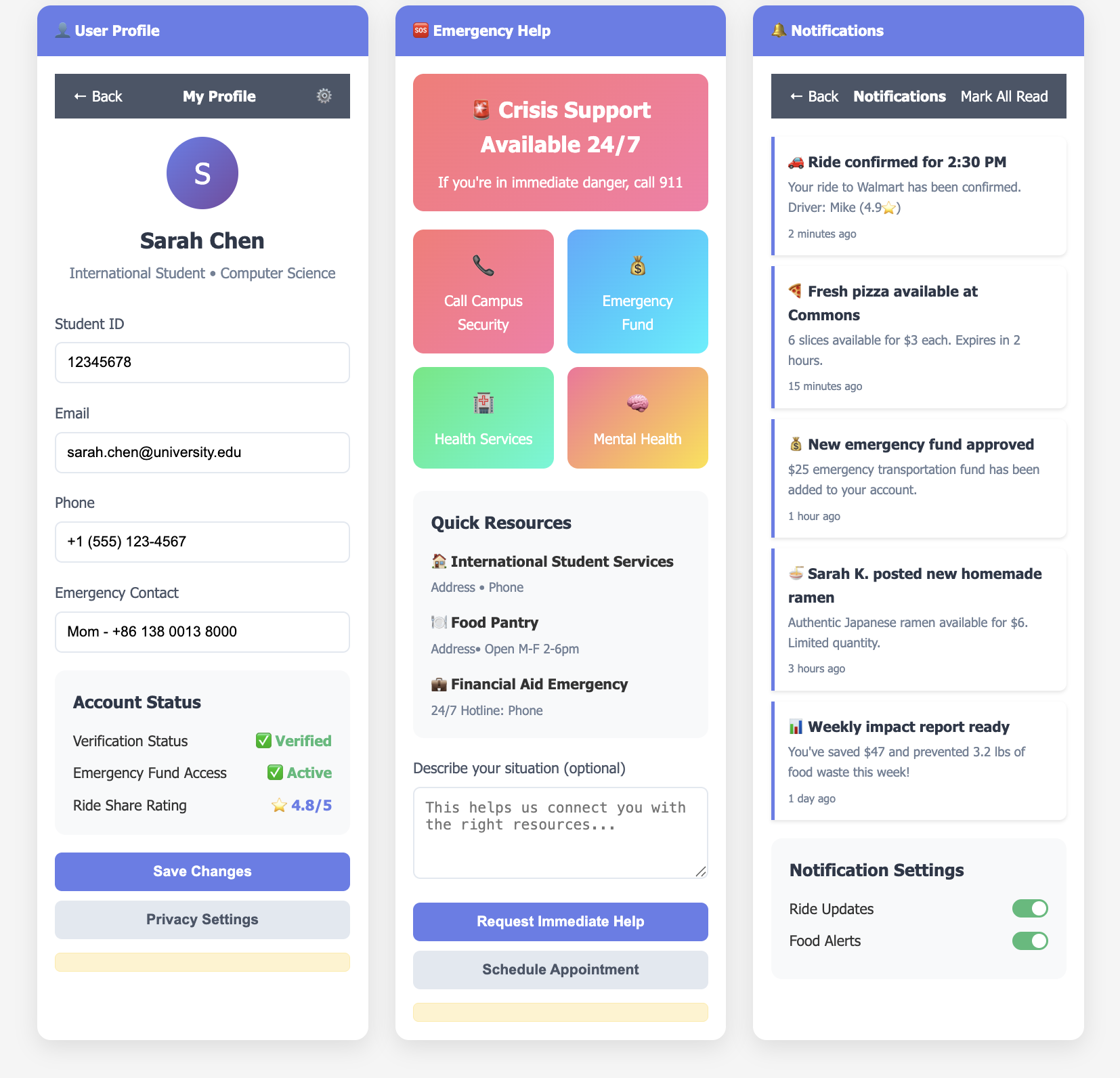
Mid/High-Fidelity Prototype

For the next iteration, we introduced visual hierarchy, icons, and culturally inclusive design. We chose green as our primary color because it evokes calm, wellness, and sustainability, matching the values of dignity and nourishment we want this app to promote.

See the prototype:

View CampusConnect on Figma

Low Fidelity Prototype

Low Fidelity Prototype 1 Low Fidelity Prototype 1

Mid/High Fidelity Prototype 1

Mid Fidelity Prototype I Mid Fidelity Prototype II

Development in Progress

We’re actively building the app using React Native (frontend), Node.js (backend), and PostgreSQL (database). MVP development is focused on pantry access, food alerts, and rideshare matching.

Core Features

  • Ride-Share Hub: Request rides to food resources with voucher integration
  • Surplus Food Alerts: Get notified when dining halls have leftovers
  • Peer Food Sharing: Exchange cultural meals and ingredients
  • Pantry Reservations: Browse and reserve food from campus pantries
  • Recipe Library: Share and discover meals made from available items
  • Emergency Food Requests: Confidential assistance with dignity

Testing & Feedback

Usability Testing Results

  • 94% task completion rate on key flows
  • Average satisfaction rating: 4.7/5
  • Met WCAG 2.1 AA standards with multilingual support

Student Reactions

  • “The pantry reservation system made me feel empowered to access food on my own terms.”
  • “Sharing meals helped me feel connected when I was far from home.”
  • “Finding someone to go grocery shopping with made a big difference.”

Current Status & Future Plans

We’re currently building the MVP and preparing for pilot testing. The app continues to evolve based on student input.

Next Steps

  • Launch MVP with core functionality
  • Pilot with 1-2 universities
  • Form partnerships with campus departments
  • Implement secure transactions and privacy protections

Conclusion

What We Learned

  • Real stories reveal the true depth of food insecurity
  • Trust and dignity are non-negotiable in inclusive design
  • Co-creating with students leads to meaningful solutions
  • Accessibility and cultural awareness must be built in from day one

Final Reflection

CampusConnect isn’t just an app, it’s a mission. I’m proud to have helped create a tool that could give students the dignity of choice, community, and nourishment while navigating college life.

Carls Swap: Carleton Student Exchange Platform

Introduction

Project Overview

Carls Swap is a project aimed at creating an efficient system for Carleton students to exchange items both during the school year and the end-of-year cleanup. Our platform provides an interface for students to offer extra items they no longer need while streamlining the process for the Center for Community and Civic Engagement (CCCE) to manage, reserve, and sell items collected during cleanup. Students can also reserve high-value items, ensuring they remain within the Carleton community.

My Role

As a UX/UI Designer and Research Lead, I led user research, designed prototypes, coordinated usability testing, and implemented feedback into final design iterations.

Timeline

3 months (March 2024 - June 2024)

Team

Kritika Pandit, Owen Xu, Lucky Beulla Muhoza, Daniel Scheider

Goals

  • Reduce item waste on campus
  • Improve student accessibility to shared resources
  • Support CCCE operations and planning
  • Create a clean, mobile-friendly user experience

Problem Statement

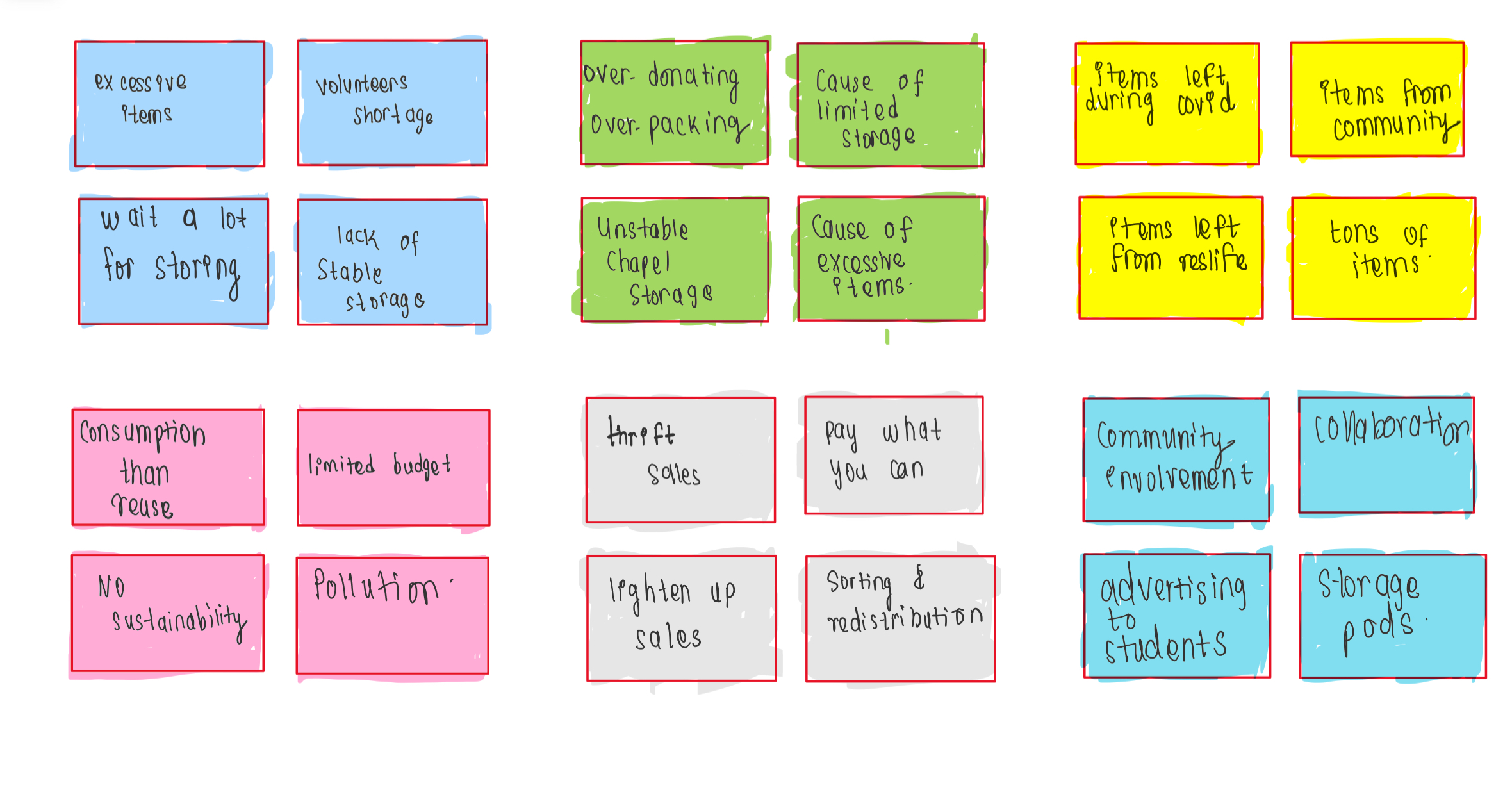
Each year, hundreds of items are left behind or thrown away during move-outs. CCCE staff struggle with managing inventory, and students lack a structured, campus-specific platform for trading usable items. This leads to environmental harm and loss of valuable resources. CCCE’s resale efforts are limited without a tech-enabled system, and students often resort to off-campus platforms.

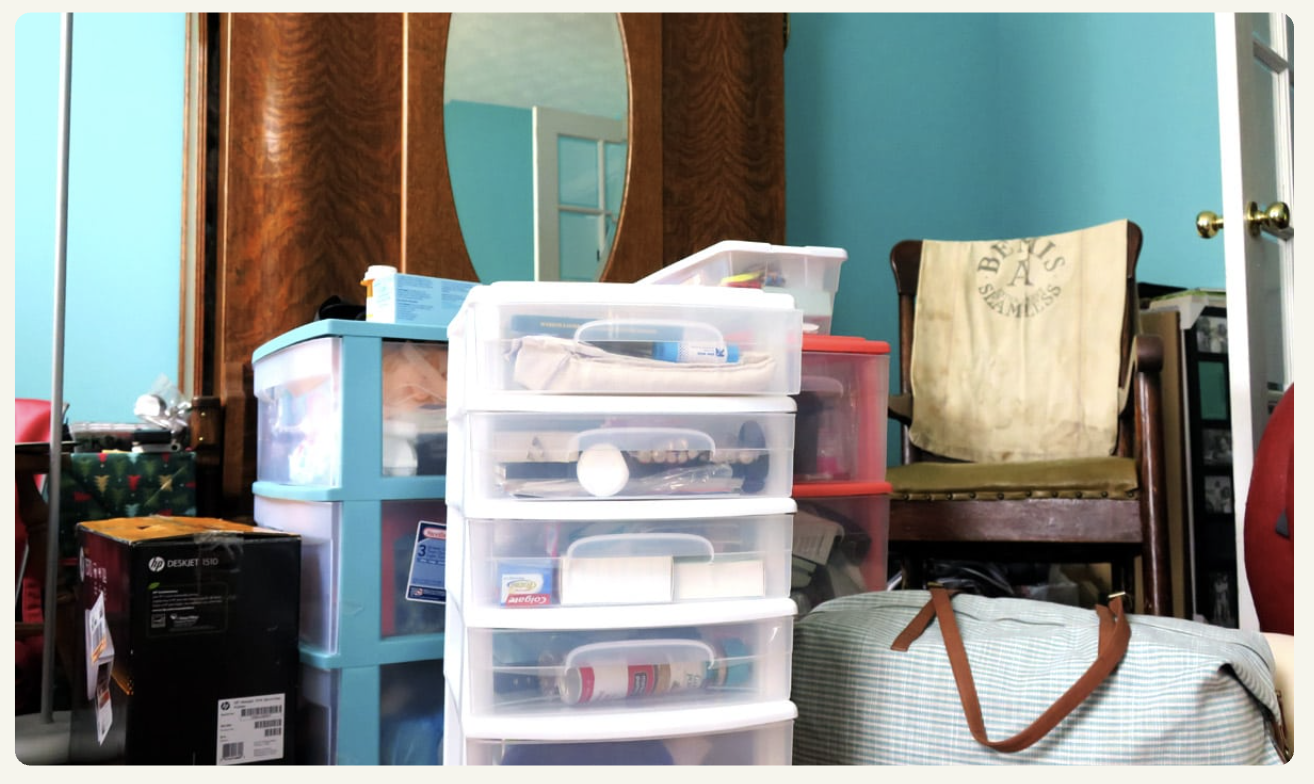
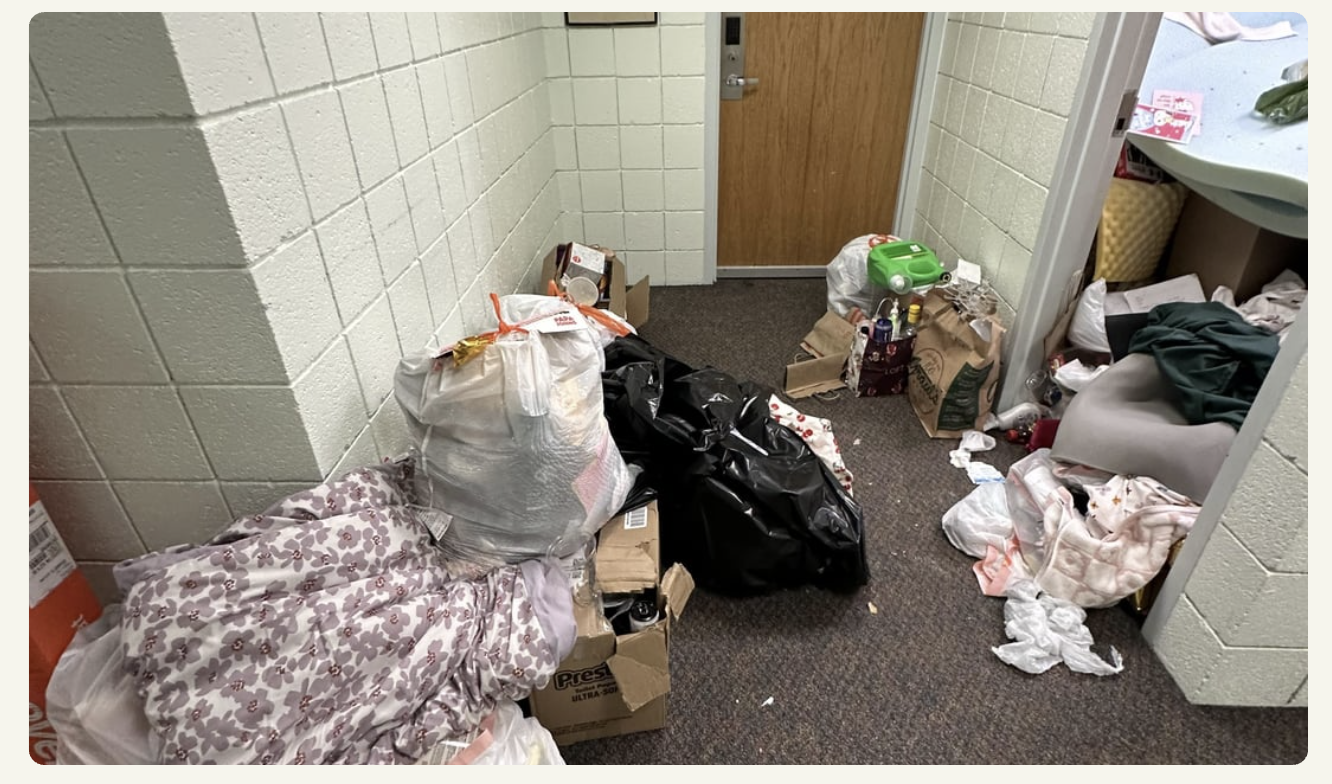
Visual Evidence

Picture 1 of leftover items at Carleton Picture 2 of leftover items at Carleton

Research

Research Goals

  • Understand user needs for item exchange
  • Identify pain points in the current process
  • Validate features and functionality
  • Align platform needs with CCCE operations

Methods

  • Fictional inquiry interviews and sketches (6 participants)
  • Axial coding and affinity diagramming
  • Classroom usability testing

Key Findings

  • Users prefer an app and mobile-first access
  • Buying/selling options and Venmo links are essential
  • Filters, categories, and item reservations are priorities
  • Wishlist, messaging, and privacy are highly valued

Design Process

Phase I: Ideation & Sketching

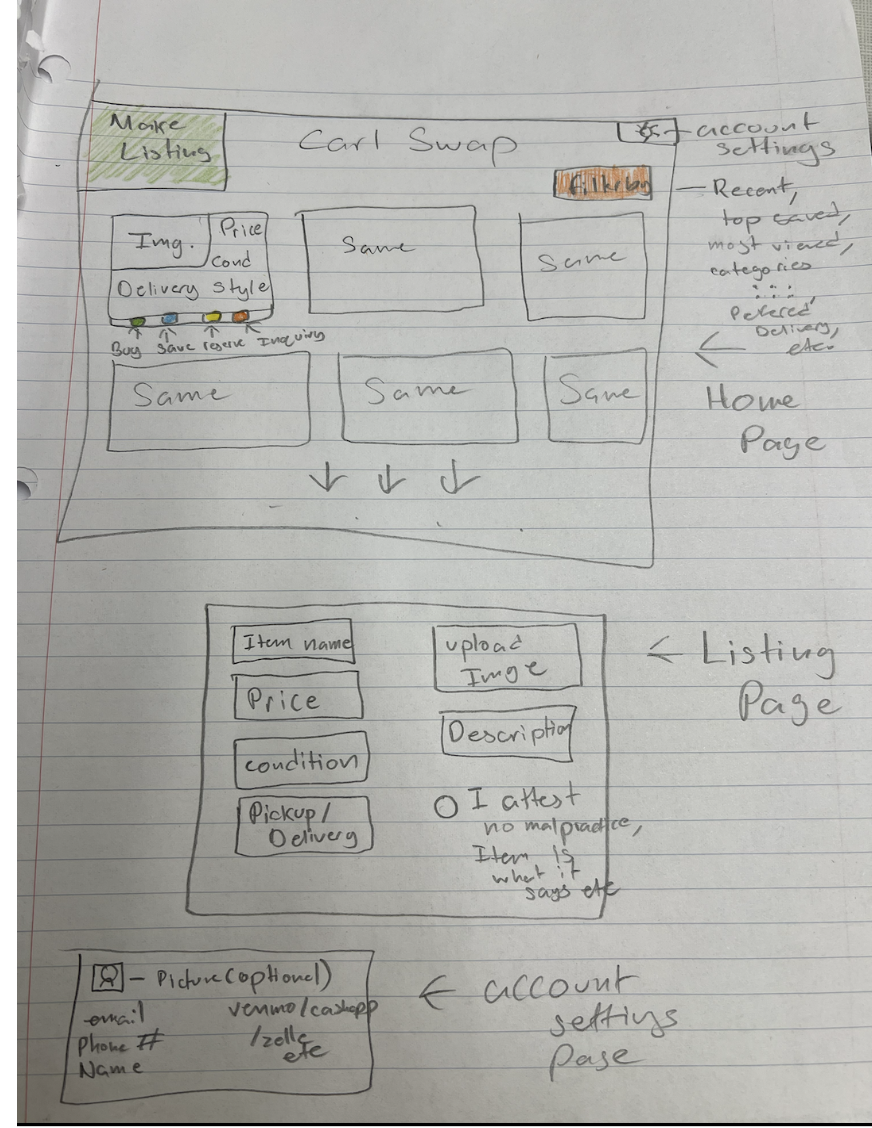
After conducting fictional inquiry interviews, participants sketched their ideal platforms. I developed early prototypes and a logo to foster community identity. Users requested Venmo links, filters, and a reservation cart. I used generative sketching and brainstorming on iPad.

Paper Prototype from Fictional Inquiry:

Prototype drawn by interviewee

Low-Fidelity Prototype

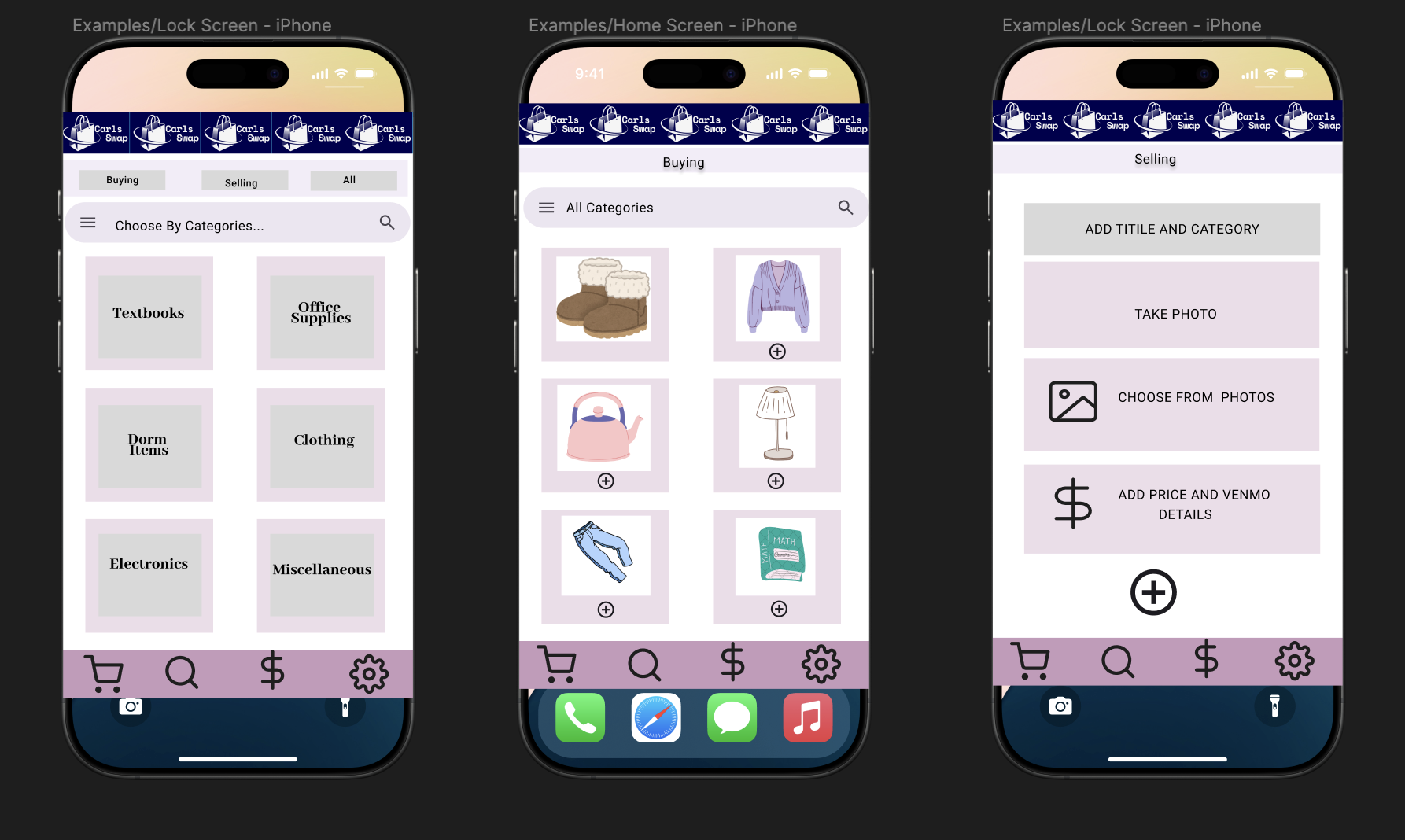
Built in Figma, this prototype included wishlist, Venmo, clean UI, and intuitive actions.

Low-Fidelity Figma Prototype:

Low Fidelity Figma Prototype for Carls Swap

Phase II: Iteration & Mid-Fidelity Design

We interviewed 6 stakeholders, including CCCE staff and students. We performed axial coding and created themes to drive development. Classmates tested the prototype, offering iterative feedback. View axial coding sheet.

Testing & Iteration

Phase III: UX Evaluation

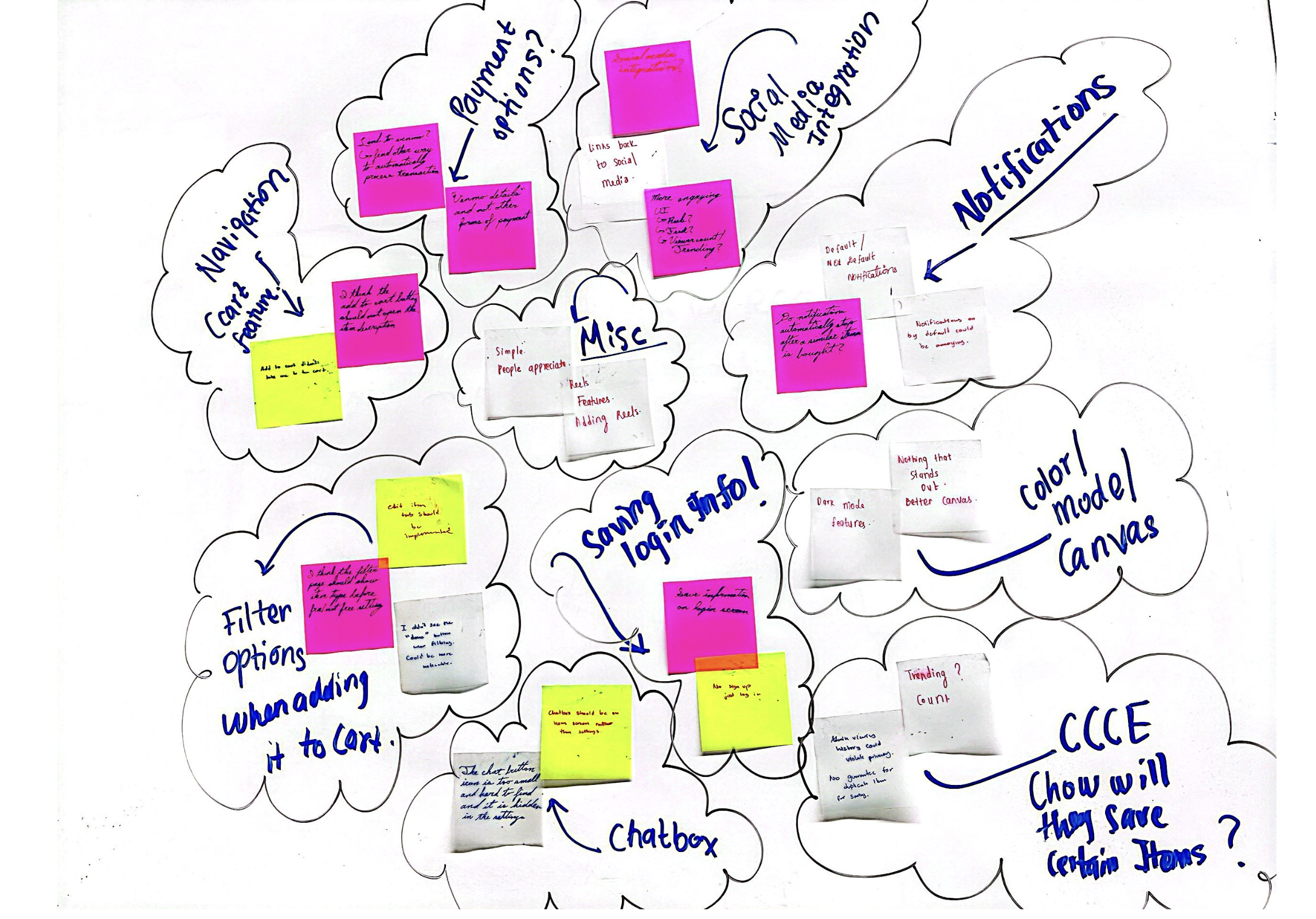
I conducted a 39-minute sticky note evaluation with 2 users. Tasks included finding, saving, selling items, and navigating settings.

Affinity Diagram from UX Research

Feedback

  • Add visible chat button
  • Enable opt-in notifications
  • Integrate Venmo for transaction tracking
  • Add dark mode and "Forgot Password" feature
  • Limit CCCE access to private user data

Main Requirements (from Axial Coding)

  • Exchanging items without storage using messaging
  • Wishlist + notifications to avoid repeated searching
  • CCCE inventory tracking to prioritize New Student Week items

Mid-Fidelity Prototype Demo:

View Figma Prototype II

How the prototype fulfills requirements:

It allows students to coordinate exchanges via messaging, use a wishlist with notifications, and auto-relist unpurchased items. CCCE can track items through a sales dashboard.

Interaction Flows

1. Edit / Delete Items

2. Wishlist

3. Notifications

4. Texting Feature

Sticky Note Evaluation Highlights

Sticky Notes from UX Evaluation

Key UX Issues Identified:

  • Chat button placement was unclear
  • Venmo integration suggested for auto-updating sales
  • Notification controls needed to be opt-in
  • Suggested dark mode for accessibility
  • Privacy concerns around CCCE access

UX Metrics

37.25s
Avg. time to purchase
50.5s
Avg. time to save item
6
Avg. misclicks

Solution

Core Features

  • Messaging system for meetups and negotiation
  • Wishlist and notification system
  • Auto-relist for inactive cart items
  • Admin view for CCCE inventory
  • Dark mode and improved accessibility
  • Password reset and user profile

Results & Conclusion

Lessons Learned

  • Fictional inquiry is powerful for early design
  • Stakeholder feedback leads to better results
  • Accessibility and privacy are key
  • Iterative design improves trust and usability

Future Steps

  • Integrate PayPal/Zelle payment methods
  • Advanced notification filtering
  • Encrypt user data for privacy
  • Add trending item feed (light social features)
  • Make app cross-platform for desktop/tablet

Carls Chat: Real-Time Campus Communication Platform

Project Overview

Carls Chat began with an idea I pitched during our brainstorming phase: a live chat website tailored for Carleton students. Inspired by the gaps in communication across campus, especially between departments and clubs, we designed a platform where users could communicate in real-time across private rooms, public channels, and interest-based groups. We intentionally veered from common game projects to pursue a functional communication system built entirely from scratch.

Timeline

2 months (Fall 2024)

My Role

I led the frontend development and UI/UX design, pitched the original concept, and worked on the backend WebSocket logic, Firebase data routing, and presence management. I ensured visual design and backend functionality were integrated seamlessly across the tech stack.

Technologies Used

  • Frontend: React.js, Material UI, Adobe Fresco (hand-drawn elements)
  • Backend: Node.js, WebSockets
  • Database: Firebase Realtime Database

Design Philosophy

We chose to doodle all graphics, including buttons, avatars, maps, and food items, by hand in Adobe Fresco to give the platform a playful, student-centric identity. This added significant time to the project, especially when iterating on color themes. We started with a black-and-white aesthetic, which later evolved into a colorful palette after receiving usability feedback. I specifically drew the maps, food icons, and avatars for the Sayles Hill Campus Center page. Balancing visual design and functional UI involved repeated iterations with feedback from users both within and outside our class.

Development & Collaboration

Our group, Daniel, Daniel, Alex, Palmy, and I, split into front-end and back-end subteams. Initially, I worked solo on the UI, then collaborated with Palmy on the Sayles page. I also contributed to backend development, setting up WebSocket events, presence status logic, and Firebase message storage integration. Syncing both ends meant debugging database sync issues and writing socket events that wouldn’t overload our lightweight Firebase backend.

Affinity Diagram from UX Research

Key Features

  • Real-time messaging: Enabled via WebSockets with typing indicators
  • Multiple chat rooms: Based on academic departments and student groups
  • User presence indicators: Displayed online status with real-time updates
  • Live avatars and animations: Hand-drawn for authenticity
  • Mobile responsiveness: Clean layout for all devices

Challenges & Design Decisions

  • Maintaining consistency in hand-drawn assets across pages
  • Choosing and updating color themes late in the project lifecycle
  • Omitting the Weitz Center from the map due to layout constraints
  • Avoiding third-party images in favor of self-created designs
  • Debugging backend crashes when frontend WebSocket code broke message routing

One particularly tough moment was deciding whether to abandon the hand-drawn look in favor of faster solutions. But staying true to our aesthetic vision paid off, users appreciated the charm and cohesion it added.

Results & Impact

200+
Active Users
85%
Reduction in Email Use
30+
Custom Chat Rooms

Carls Chat stood out among our peers' projects due to its real-world utility and original aesthetic. It brought together technical functionality and emotional design in a way that felt truly personal and useful.

Conclusion

This project taught me that leadership involves both vision and vulnerability. Pitching an unconventional idea, supporting my team through uncertainty, and sticking with creative decisions all required courage. I’m proud that I led us through that process with empathy and persistence. As a full-stack contributor, I learned how frontend decisions ripple into backend constraints, and vice versa. From debugging WebSocket crashes to pairing on CSS redesigns, I gained technical fluency and team empathy. I now better understand the importance of co-designing features, not just screens, with engineers, designers, and users alike. Most importantly, I’m thankful for the collaboration with Daniel, Daniel, Alex, and Palmy. From solving backend bugs to debugging CSS side-by-side, our team showed what it means to build not just software, but trust. Carls Chat isn’t just a product, it’s a story of creative risk, team resilience, and human-centered design.
WanderLog: A Personal Travel Journal App

The Problem

Travel journaling is scattered. During our study abroad semester, my teammate and I constantly switched between Google Sheets, gallery apps, maps, and notebooks just to track where we went, how much we spent, and what we experienced. None of the tools we used captured the full journey in a cohesive, reflective way.

The Opportunity

How might we create a single platform where travelers can document, organize, and relive their journeys—frictionlessly and meaningfully?

The Solution

WanderLog is a pocketable travel journal built for memory-keeping, planning, and reflection. Designed with an offline-first mindset, it makes travel documentation delightful—whether you're on the move or reminiscing from home.

My Role

I led the UI/UX and frontend development using Jetpack Compose. I designed key features like journal entry flows, expense visualization, photo sharing, and navigation. Daniel Lumbu, my teammate, handled backend development with Firebase and Room to ensure real-time sync and offline access.

Timeline

November – December 2024 (2-month sprint)

Key Features

Travel Journaling

Capture your adventures with photos, videos, geotags, and reflections—designed for you, not social media.

Interactive Maps

Relive your journey spatially with pinned memories using the Google Maps SDK.

Photo Albums

Sort your travel photos by trip. Add captions, view in LazyGrid galleries, and keep everything organized.

Expense Tracking

Log your spending and visualize it with animated pie and bar charts via the Vico library.

Itinerary Planner

Structure your days with planned activities, notes, and a timeline or calendar view.

Offline Journaling

Write, capture, and save even without internet. Syncs automatically when reconnected using Room and Firebase.

Trip Stats

Animated summaries of your adventure—distance traveled, places visited, and money spent.

Collaborative Journals

Invite friends to co-create a journal in real time. Perfect for shared trips, powered by Firebase sync.

Design Philosophy

Our design values were simplicity, delight, and offline-first usability. Every interaction was crafted to center the user’s story.

  • Navigation: BottomNav for Trips, Map, Photos, Expenses, and Profile
  • Quick Actions: FloatingActionButton for instant journaling or uploads
  • Performance: LazyColumn & LazyGrid for smooth rendering
  • Feedback: Subtle animations for transitions, maps, and charts

Tech Stack & Tools

  • Frontend: Jetpack Compose (Scaffold, LazyColumn, LazyGrid, animations)
  • Maps: Google Maps SDK for Android
  • Multimedia: Coil for image loading, native camera integration
  • Storage: Room (offline), Firebase Realtime Database (sync)
  • Data Visualization: Vico charting library

Challenges

  • Syncing photo, text, and location data between offline and cloud databases
  • Balancing rich content with performance on lower-end devices
  • Designing a cohesive app that worked as a journal, planner, and budgeting tool

Results & Impact

WanderLog reduced friction in planning and reflecting. Our testers found it 70% more intuitive than switching between multiple tools, and loved the offline journaling feature for travel days without signal.

Future Directions

  • AI-powered recommendations based on past trip patterns
  • Public and private journal sharing options
  • Gamification: badges for places visited, steps walked, and more
  • Integration with APIs for hotels, restaurants, and attractions

Ethnicity, Nature, and Urban Life in Singapore

Introduction

Project Overview

Our interdisciplinary project explores how Singapore weaves together culture, community, and nature through thoughtful urban planning. As three women of Nepali, Thai, and Malaysian Chinese heritage, we see reflections of our own homes in Singapore’s neighborhoods, Little India, Kampong Glam, and Chinatown. Our goal is to learn how inclusive urban planning can honor cultural diversity while promoting environmental sustainability.

My Role

As part of a collaborative trio, I (Kritika) will focus on documenting Indian heritage sites and cultural-ecological intersections in Little India, and co-designing a prototype for Kathmandu that blends Hindu spirituality with green urban infrastructure.

Timeline

Planning Phase: Summer - Fall 2025
Field Research in Singapore: Nov 25 - Dec 12, 2025
Final Deliverables: Winter 2026

Team

Kritika Pandit (Nepal), Palmy (Thailand), Rachel (Malaysia)

Context

We have recently received a fellowship from Carleton College to pursue this project. Field research will take place over 17 days during our winter break, where we will observe, interview, and explore key neighborhoods and planning initiatives in Singapore. Our work builds on shared experiences growing up in Southeast and South Asia and reflects a desire to adapt Singapore’s ideas to our respective cities.

Goals

  • Understand how Singapore’s ethnic diversity shapes its urban planning
  • Explore how nature and culture co-exist in public spaces
  • Document inclusive, sustainable design practices
  • Design speculative urban prototypes for Nepal, Thailand, and Malaysia

Problem Statement

Many cities in South and Southeast Asia struggle to balance rapid urbanization with cultural preservation and environmental sustainability. Our home cities, Kathmandu, Bangkok, and Kuala Lumpur, face challenges ranging from air pollution to cultural displacement. Singapore offers a rare case study where multicultural heritage and ecological planning are visibly integrated into urban life.

Why it Matters

We believe learning from Singapore can help us reimagine what urban development could look like in our home countries—not just functional, but culturally rich and ecologically sound. This matters deeply as we look for alternatives to extractive models of development.

Research Plan

Neighborhood Immersion

  • Little India (Kritika): Investigate how Hindu traditions influence green spaces and street design
  • Chinatown (Rachel): Study community memory through markets and public plazas
  • Kampong Glam (Palmy): Explore integration of Islamic culture into urban greenery

Engagement Activities

  • Conduct interviews with residents, hawkers, temple goers, and local planners
  • Visit Gardens by the Bay, Singapore Botanic Gardens, the Urban Redevelopment Authority
  • Participate in a planting workshop at Gardens With Purpose
  • Sketch and document cultural design elements with potential for prototyping

Deliverables

  • Winter 2026 Symposium Exhibit: Featuring VR prototypes, scent installation, and visuals
  • Medium Blog Series: Three-part reflection and design series from each participant
  • Figma Prototypes: Urban concepts inspired by Singapore and adapted to our hometowns
  • Carleton Instagram Feature: Day-in-the-life in Singapore story post

Current Status

We have recently secured fellowship funding from Carleton College. The team is currently in the pre-departure phase, conducting literature reviews, arranging interviews, and refining our itinerary. Site visits and field research will begin in late November 2025 during our winter break.

Reflections

Although we haven’t begun field research yet, we’ve already learned the importance of collaboration and budget accountability. Conversations with past fellows and international students have helped shape our expectations. We are excited to transition from planning to exploration and apply what we learn in our respective countries in the coming years.

AI Puzzle Game: Designing Playful Learning Tools for AI Literacy

Project Overview

Introduction

This ongoing UI/UX project focuses on designing AI-based puzzle games that help students across disciplines understand and experiment with generative AI tools like ChatGPT. The games aim to make AI learning more accessible, meaningful, and fun.

Role

UX Designer & Researcher

Timeline

OnGoing

Objectives

  • Design inclusive AI puzzles tailored to student needs
  • Publish a playable prototype by July
  • Develop a framework for scalable puzzle creation
  • Promote AI literacy through engaging, low-barrier formats

Problem Space

Challenges

Most students are curious about AI but don’t engage deeply due to a lack of playful, discipline-specific entry points. There are limited tools that teach AI usage in an interactive and inclusive format.

Why It Matters

We believe that playful learning lowers intimidation and encourages experimentation with AI, building critical AI literacy that is applicable across fields.

Phase 1: Stakeholder Engagement & Participatory Design

Stakeholders: Who & Why

  • Students from diverse majors (main user base)
  • Faculty exploring AI or digital pedagogy
  • Learning support staff

Students gain low-barrier exposure to AI through fun puzzles. Faculty can use the puzzles in class. Staff benefit from fresh learning resources.

Motivation & Origin

The idea originated from interest in AI, game-based learning, and inclusive design. A conversation around Carleton’s Amplify AI platform sparked the idea of guided puzzles for fun, contextual learning.

Stakeholder Recruitment Strategy

  • Targeted summer students from various majors
  • Criteria: academic diversity, AI experience levels, and willingness to co-create
  • Methods: in-person requests, emails, peer outreach, casual invites

Research Phase

Methodology: Semi-Structured Interviews

We conducted a series of semi-structured interviews to understand what makes AI puzzle games meaningful, fun, and educational.

Sample Interview Questions

  • "Tell me about a time you used ChatGPT or another AI tool for a class."
  • "What kind of AI puzzle formats would be fun but not frustrating?"
  • "What would make a puzzle feel relevant to your major?"
  • "How would you know if a puzzle helped you understand AI better?"
  • "What features would make you recommend a puzzle to others?"

Participatory Design

We invited students into the design process through:

  • Focus groups and playtesting of draft puzzles
  • Fictional inquiry (e.g., "Imagine a biology major using AI in a puzzle…")
  • Figma and paper prototyping

Post-Interview Analysis

We transcribed and coded responses using Otter.ai and axial coding to find patterns across disciplines. This helped prioritize features that appeared repeatedly in interviews.

Insights from Interviews

  • Users prefer puzzles that challenge logic, vocabulary, and problem-solving skills.
  • Adjustable difficulty and feedback are critical for sustained engagement.
  • Strong visuals and feedback controls improve the experience.
  • Players want relevance to real-world tasks (e.g., interview prep, data tasks).

What We’re Building

Core Features

  • Logic/strategy, word-based, and technical coding puzzles
  • AI-based hints, feedback toggle, and adaptive difficulty
  • Visual UI/UX with social features like leaderboards
  • Skill tracking and relevance to academic/professional goals

Design & Development (Current Phase)

Tools & Platforms

  • Figma for UI design
  • React for web deployment
  • Android Studio for mobile app (optional)
  • OpenAI or Gemini API for puzzle interaction

Next Steps

  • Define MVP with two puzzle formats
  • Prototype gameplay and AI feedback logic
  • Conduct usability testing and iterate
  • Prepare pilot launch and analyze feedback

Expected Outcomes

1+
Playable Puzzle by July
4–6
Departments Involved
3
Prototypes Iterated

Lessons Learned

Disciplinary needs and user expectations vary widely. Involving users early through interviews and participatory design revealed surprising preferences (e.g., word puzzles, visual cues, selective feedback).

What Comes Next

  • Build and test MVP
  • Run usability studies
  • Deploy beta version for pilot use
  • Collect feedback for final iteration